Notes to flashcards
How to turn notes into flashcards you will actually use
The fastest workflow is not to copy every sentence. Find the ideas worth recalling, turn each into one clear prompt, check the answers, and start practising while the material is still familiar.
Reviewed July 21, 2026
The short answer
Select the definitions, relationships, steps, examples, and exceptions you need to retrieve later. Write one question per idea, keep the expected answer specific, and remove cards that only test wording. AI can create a first draft from a photo, but reviewing that draft is what makes the deck trustworthy.
A notes-to-flashcards workflow that stays focused
- 1
Mark recall-worthy ideas
Look for concepts your course, exam, or real task expects you to explain, distinguish, calculate, or apply.
- 2
Create one prompt per idea
Split crowded notes into questions with a clear expected answer instead of turning whole paragraphs into card backs.
- 3
Edit before you practise
Correct errors, add missing context, remove duplicates, and make sure you can judge whether an answer is right.
Choose knowledge that benefits from retrieval
Flashcards are strongest when the material has a question you can answer from memory. Definitions, vocabulary, sequences, causes, contrasts, formulas, short explanations, and diagnostic clues fit naturally. A page may contain background sentences that help you understand the topic but do not need a card of their own.
Before creating anything, decide what success looks like. If the exam asks you to compare two theories, cards should practise the differences and evidence, not only their names. If you need to speak a language, include prompts that make you produce the phrase as well as recognize it.
- Prefer questions you can answer without seeing the notes.
- Separate two independently testable ideas into two cards.
- Keep longer source explanations in your notes and test their key point.
Use AI as a draft, not as the final authority
Scanning notes can remove repetitive typing and surface likely questions quickly. It does not remove the need to check the source. Handwriting, abbreviations, diagrams, and subject-specific notation can be interpreted incorrectly, and a fluent answer can still miss the emphasis your teacher intended.
Review the generated deck while the original page is beside you. Fix factual errors first, then improve prompts that could accept several different answers. Delete low-value cards rather than keeping them just because they were generated. A smaller reliable deck is easier to maintain.
Move from creation to practice quickly
Card creation can feel productive while postponing the harder work of retrieval. Set a limit for editing, then complete a short first session. Cards that feel confusing during practice reveal where a prompt or answer still needs work.
After the first session, keep due reviews moving and introduce new cards at a pace you can sustain. For material that requires problem solving or extended writing, use flashcards for the building blocks and add full practice questions separately.
Notes to flashcards
Turn a page into a Memko deck
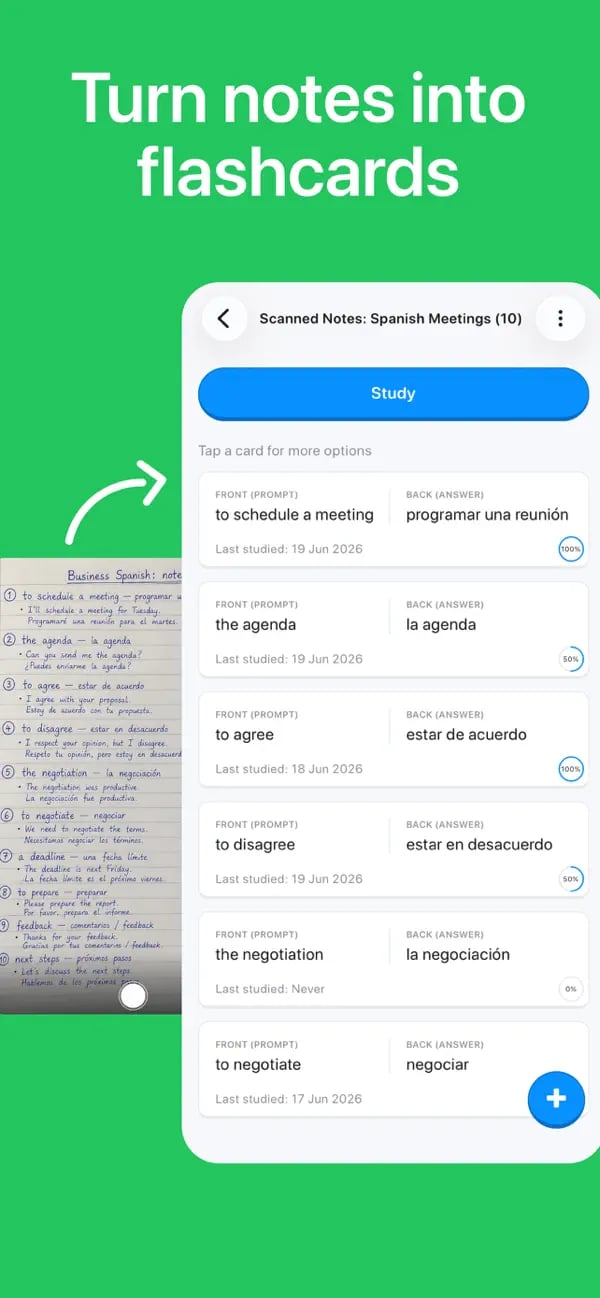
Memko keeps the source-to-practice flow on your phone and leaves every generated card editable.
- 1
Open Add Cards, choose Scan notes, and take a clear photo or select one from your library.
- 2
Tell Memko what the scan should focus on, then compare the generated cards with the original page.
- 3
Edit or remove weak cards, save the deck, and begin with Flashcards or Quiz mode.
Notes-to-flashcards questions
Common decisions when converting your own material.
Keep learning
Sources and further reading
Turn today’s notes into tomorrow’s knowledge
Create a deck, follow a personalized plan, and keep important ideas moving through short daily practice.
Free to download on iOS and Android