Alternatywa dla Anki
Memko czy Anki: prosty start lub szczegółowa kontrola fiszek
Anki to dojrzały system open source nastawiony na konfigurację, synchronizację, duże kolekcje, szablony, multimedia i dodatki. Memko oferuje prostszą mobilną drogę od tematu lub zdjęcia do edytowalnych kart, spersonalizowanych kursów i różnorodnych codziennych ćwiczeń.
Fakty zweryfikowano 21 lipca 2026 r.
Szybki werdykt
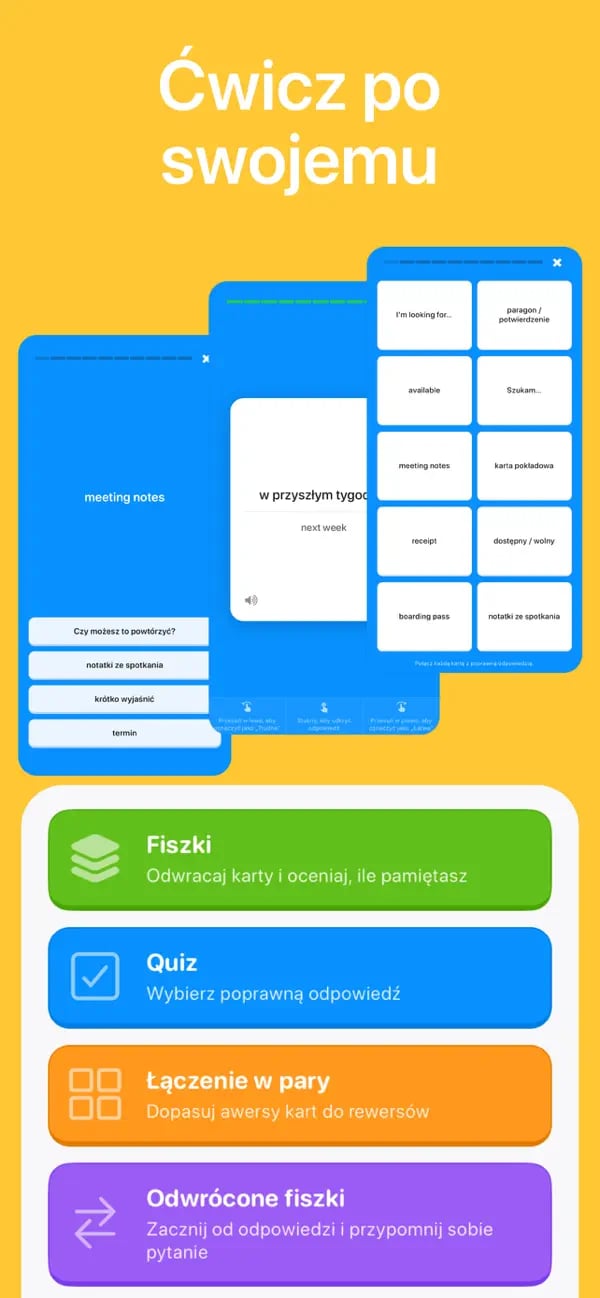
Wybierz Anki, jeśli potrzebujesz szczegółowych szablonów, dodatków, synchronizacji między urządzeniami, zaawansowanej kontroli harmonogramu i bardzo dużych kolekcji. Wybierz Memko, jeśli zależy Ci na tworzeniu z AI, łatwiejszym starcie na telefonie, spersonalizowanych planach i czterech gotowych trybach bez konfigurowania złożonego systemu.
Memko i Anki w skrócie
| Obszar | Memko | Anki |
|---|---|---|
| Konfiguracja | Prowadzone wdrożenie, generowanie z tematu, skanowanie notatek i spersonalizowane kursy | Ręczne lub importowane notatki, karty, typy notatek i konfiguracja talii |
| Planowanie | Wbudowane powtórki rozłożone w czasie z celami dziennymi i jasną kolejką | Zaawansowany harmonogram z rozbudowanymi ustawieniami i kontrolą dla wymagających użytkowników |
| Tworzenie z AI | Wbudowane dla tematów i zdjęć notatek | Nie jest podstawową funkcją wersji komputerowej; dodatki społeczności i narzędzia zewnętrzne działają różnie |
| Tryby nauki | Fiszki, odwrócone fiszki, wielokrotny wybór i dopasowywanie | Wysoce konfigurowalne szablony kart i przebieg powtórek |
| Personalizacja | Edycja kart i konkretne ustawienia nauki | Rozbudowane szablony, multimedia, znaczniki, dodatki i konfiguracja harmonogramu |
| Platformy | Aplikacje na iOS i Androida | Darmowe aplikacje komputerowe, oficjalne płatne AnkiMobile na iOS, społecznościowe AnkiDroid na Androida i synchronizacja AnkiWeb |
| Synchronizacja | Lokalna biblioteka z kopią zapasową CSV | Synchronizacja przez AnkiWeb między obsługiwanymi aplikacjami |
Wybierz Memko, gdy największą przeszkodą jest konfiguracja
Memko pozwala szybko przejść od celu do nauki. Opisz konkretny temat, zeskanuj stronę albo utwórz spersonalizowany kurs, sprawdź wygenerowane karty i wybierz tryb. Cele dzienne i fiszki na dziś są widoczne bez dostrajania wielu ustawień harmonogramu.
To rozwiązanie dla osób, które chcą korzystać z aktywnego przypominania i powtórek w odstępach, ale nie chcą przed pierwszą sesją projektować typów notatek, szablonów kart, dodatków i ustawień talii.
- Tworzenie z tematu i zdjęcia przy pomocy AI jest wbudowane w aplikację.
- Kursy układają prowadzoną sekwencję lekcji, powtórek i wyzwań.
- Quiz i dopasowywanie działają bez konfigurowania nowych szablonów kart.
Wybierz Anki, gdy najważniejsze są kontrola i skala
Anki obsługuje bardzo duże kolekcje, dźwięk, obrazy, wideo, zapis naukowy, własne układy, dodatki i szczegółowe ustawienia harmonogramu. Szczególnie dobrze sprawdza się u osób z dojrzałym systemem talii lub specjalistycznym procesem nauki.
Ta elastyczność wymaga czasu na opanowanie. Oficjalna aplikacja na iOS jest płatna, wersje komputerowe są darmowe, a na Androidzie działa rozwijany przez społeczność AnkiDroid. Sprawdzaj oficjalne linki, bo aplikacje o podobnych nazwach nie muszą należeć do projektu Anki.
Migracja wymaga więcej niż skopiowania tekstu
Memko importuje CSV, a nie pakiety Anki. Eksport CSV może przenieść podstawowe pola tekstowe należące do Ciebie, ale typy notatek, generowane szablony kart, odwołania do multimediów, tagi, dane dodatków i historia planowania mogą wymagać pracy ręcznej lub wcale się nie przenieść.
Najpierw wyeksportuj i przetestuj jedną reprezentatywną talię. Zachowaj oryginalną kolekcję Anki oraz kopię multimediów, dopóki nie sprawdzisz wyniku w Memko na docelowym urządzeniu.
Pytania o Memko i Anki
Sprawdź, jakiego poziomu kontroli potrzebujesz.
Źródła i materiały uzupełniające
- Oficjalny opis Anki
- Oficjalne pliki do pobrania Anki
- Podręcznik Anki: najważniejsze pojęcia
- Memko w App Store
Anki jest znakiem towarowym należącym do odpowiedniego właściciela. To niezależne porównanie nie jest powiązane z projektem Anki ani przez niego rekomendowane.
Zamień dzisiejsze notatki w wiedzę na dłużej
Utwórz talię, realizuj spersonalizowany plan i utrwalaj ważne informacje w krótkich codziennych sesjach.
Pobierz za darmo na iOS lub Androida